
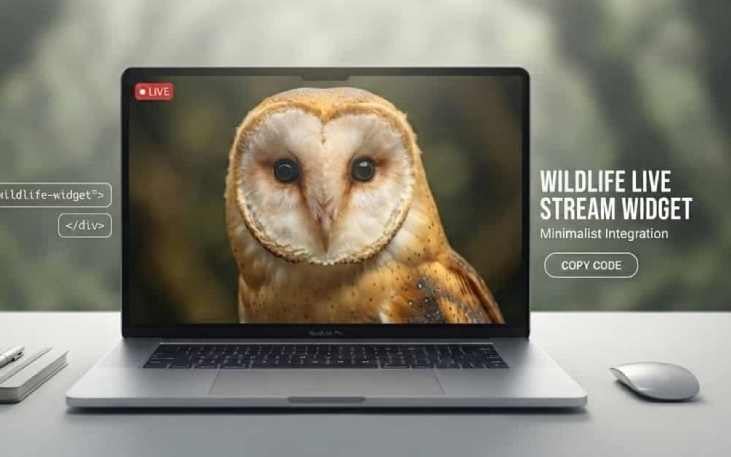
Embed Our Live Barn Owl Stream on Your Website: Free and Easy

🦉 Add Our Live Wildlife Streams to Your Website! 🌿
Would you like wild barn owls, badgers and foxes on your own website? You're very welcome to use our live wildlife webcams. They stream 24 hours a day from the Peak District National Park, they're completely free, and there's nothing for you to maintain. Copy the code, paste it into your page, and you're done in a few minutes. 🚀
It's a lovely way to give your visitors something special to watch, and a great reason for them to come back. Each camera starts muted, plays straight away on phones, tablets and computers, and keeps itself up to date.
📹 Choose a live wildlife camera
Each camera below is playing live right now. Scroll down to see it, then copy the code for the one you'd like.
🦉 Live barn owl camera
Our most popular camera. Buster, our wild barn owl, in his whisky barrel nest box inside an old barn. Roosting by day, heading out to hunt at dusk, and in the nesting season, eggs and owlets. More about this camera.
Copy this code for your website:
<div style="max-width:800px;margin:0 auto;"><div style="position:relative;padding-top:calc(56.25% + 125px);"><iframe src="https://peaky-weather.web.app/Barn_Owl_Live_Widget02.html" style="position:absolute;top:0;left:0;width:100%;height:100%;border:0;overflow:hidden;" scrolling="no" allow="autoplay; encrypted-media" allowfullscreen loading="lazy" title="Live barn owl camera from Barn Owl Live"></iframe></div></div>Copied ✓
🦡 Live badger and fox camera
Wild badgers and foxes every night from BadgerWood, a small wood in the Peak District, and woodpeckers, nuthatches and other woodland birds by day. More about this camera.
Copy this code for your website:
<div style="max-width:800px;margin:0 auto;"><div style="position:relative;padding-top:calc(56.25% + 125px);"><iframe src="https://peaky-weather.web.app/BadgerWood_Live_Widget.html" style="position:absolute;top:0;left:0;width:100%;height:100%;border:0;overflow:hidden;" scrolling="no" allow="autoplay; encrypted-media" allowfullscreen loading="lazy" title="Live badger and fox camera from Barn Owl Live"></iframe></div></div>Copied ✓
🕊️ Live nest box camera (MeadowView)
A nest box with all sorts of visitors. Barn owls are its most famous guests, but stock doves and other wildlife come and go too. More about this camera.
Copy this code for your website:
<div style="max-width:800px;margin:0 auto;"><div style="position:relative;padding-top:calc(56.25% + 125px);"><iframe src="https://peaky-weather.web.app/MeadowView_Live_Widget.html" style="position:absolute;top:0;left:0;width:100%;height:100%;border:0;overflow:hidden;" scrolling="no" allow="autoplay; encrypted-media" allowfullscreen loading="lazy" title="Live MeadowView nest box camera from Barn Owl Live"></iframe></div></div>Copied ✓
📺 Wildlife MultiView
Several of our cameras on one screen: the owl nest boxes and BadgerWood, all at once. Perfect for a page your visitors like to leave open. More about this camera.
Copy this code for your website:
<div style="max-width:800px;margin:0 auto;"><div style="position:relative;padding-top:calc(56.25% + 125px);"><iframe src="https://peaky-weather.web.app/MultiView_Live_Widget.html" style="position:absolute;top:0;left:0;width:100%;height:100%;border:0;overflow:hidden;" scrolling="no" allow="autoplay; encrypted-media" allowfullscreen loading="lazy" title="Live wildlife MultiView from Barn Owl Live"></iframe></div></div>Copied ✓
✅ What's included: a welcome screen while the stream loads, a Refresh button, and a small credit underneath for Barn Owl Live. If a camera goes offline, it shows a friendly message and comes back by itself.
💻 How to add a live camera to your website
WordPress
Adding a camera to a WordPress site takes less than a minute with the block editor. ⏱️
- Copy 📋 the code for the camera you'd like.
- Open your WordPress dashboard and go to the post or page where you want the camera.
- Click the + button to add a new block.
- Search for and choose the Custom HTML block.
- Paste the code into the block.
- Click Preview to see it working, then Update or Publish. ✨
Using Elementor? Drag an HTML widget into your layout, and paste the code into it.
Wix, Squarespace, Shopify and other website builders
The cameras use standard HTML, so they work on almost any website. 🌍
- Copy 📋 the code.
- Open your website editor.
- Add a new element, and look for Embed Code, Custom HTML or Code Block.
- Paste in the code, then save and publish your page. 🌟
A standard HTML website
If you write your own website, or you're passing this to your web developer, just paste the code into the <body> of your page wherever you want the camera to appear. It centres itself, and resizes to fit phones, tablets and computers. 📱
Great places to use a live wildlife webcam
- Schools and nature clubs: a live window into wildlife for lessons and projects
- Holiday cottages and campsites in the Peak District: a taste of the local wildlife for your guests
- Wildlife groups and conservation charities: something to watch between your own news and events
- Nature, gardening and walking blogs
- Care homes and waiting rooms: gentle, calming viewing on a screen
🎥 Want to stream your own wildlife?
Perhaps you'd like a live camera in your own nest box, or on the badgers in your wood. It's easier than you might think, and I share everything I've learned setting up our cameras in these guides:
❓ Questions people ask
Are the wildlife webcams really free to use?
Yes. They're free for personal, school, community and business websites, and there's nothing to sign up for.
Will the live stream play sound?
No. Every camera starts muted, so it never surprises your visitors with sound. Starting muted is also what lets phones and tablets play the stream straight away.
Do I need to update the code when the stream restarts?
No. Each camera finds its current live stream by itself, so it keeps working even when the stream restarts with a new video.
What happens if a camera goes offline?
The player shows a short message saying the camera is taking a break, and comes back by itself when the camera is live again.
Will it slow down my website?
No. The camera loads separately from your page, and it only starts loading when a visitor scrolls down to it.
Can I change the size?
Yes. The code resizes to fit your page on phones, tablets and computers, up to 800 pixels wide. To make it smaller, change the 800px near the start of the code.
Can I set up a live stream of my own wildlife?
Yes, and it's easier than you might think. My guides below explain how I choose and fit the cameras, and how I stream them to YouTube.
👋 Once you've added a camera to your website, I'd love to see it! Tag @BarnOwlLive, or get in touch. And if you need a hand adding one, just ask.
Paul 🦉
Please share this article if you like it!