
RTSP Address Builder for CCTV Cameras, NVRs and DVRs

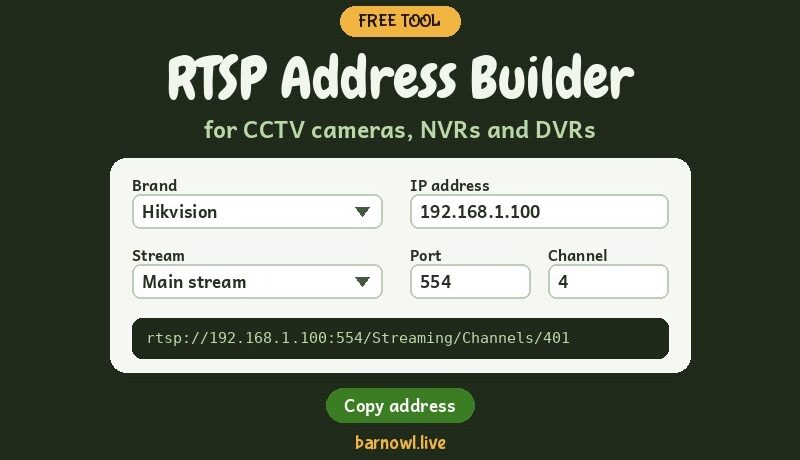
Getting the RTSP address right is often the hardest part of streaming a CCTV camera to OBS, VLC or a streaming box. So I've made a simple builder to do it for you. Choose your brand, type in the IP address, pick a stream, and it writes the address for you, ready to copy.
Just answer five quick questions: where the camera is plugged in, its brand, its IP address, which picture you want, and what you'll use the address in. It works for a camera on its own or one plugged into an NVR or DVR recorder, and on Hikvision and Dahua recorders it can even build an address to play back recorded footage between two times.
How to use the builder
Just answer the five questions, and your address appears at the bottom, ready to copy.
- Where is your camera plugged in? Choose your router or network switch for a camera on its own, or an NVR or DVR if it's plugged into the back of a recorder.
- Which brand is it? If you're not sure, tap Not sure? Tell me which app you use, and the builder picks the right format from the app on your phone.
- What's its IP address? You'll find it in your router's list of devices or in the camera's app. For a recorder, also enter the channel the camera is plugged into.
- Which picture do you want? The main stream is full quality, and best for YouTube.
- What will you use it in? For OBS or VLC, type your camera's username and password, and they're built into the address. For a streaming box like the Kiloview MG300, the address is left without them, as the box has its own login boxes.
Then click Copy address, and test it in VLC before using it anywhere else. Don't want to type your real login? Tick Use placeholders instead, and the address is built with USERNAME and PASSWORD for you to fill in later. If you need a different port, or want to play back a recording from a Hikvision or Dahua recorder, or a camera with a memory card, use the More options under step 5.
Your password stays with you. The builder runs entirely in your browser. Nothing you type is sent anywhere or saved.
Streaming a wildlife webcam to YouTube
I first put this together for people setting up wildlife cameras, and it's exactly how every camera on Barn Owl Live works. Our barn owl webcam, tawny owl nest box camera and badger and fox camera are all ordinary IP CCTV cameras. Each one sends its picture over RTSP to a streaming box, which streams it live to YouTube, 24 hours a day.
So if you'd like to run your own wildlife webcam, whether it's a barn owl nest box, a bird box in the garden or a camera watching for badgers and foxes, the RTSP address is the key that connects your camera to YouTube. Once you have it, it goes into OBS or a streaming box, and from there to your YouTube channel.
- Choosing and fitting the camera: my guide to CCTV nest box cameras covers why I always use IP cameras, mini PTZ cameras, infrared and lighting.
- Going live on YouTube: see how to live stream your wildlife cameras to YouTube.
- Building the box: see how I make owl nest boxes from old whisky barrels, with cameras built in.
- Seeing it in action: watch our live barn owl webcam and the other live wildlife cameras from the Peak District.
Want the full details?
If your brand isn't in the builder, or you'd like to understand what each part of the address means, have a look at my RTSP address directory for CCTV cameras. And if you're setting up a camera for wildlife, my guide to CCTV nest box cameras and RTSP streaming explains how it all fits together, from choosing the camera to streaming it to YouTube.
Add this builder to your website
Run a CCTV, security or wildlife website? You're very welcome to put this builder on your own site, for free. Just copy the HTML code below and paste it into your website. It works on most websites, keeps everything in your visitors' browsers, and I'll keep it up to date for you.
<style>
  .bol-rtsp-widget { display: block; width: 100%; border: none; overflow: hidden; height: 1500px; }
  @media (max-width: 650px) { .bol-rtsp-widget { height: 1950px; } }
</style>
<iframe class="bol-rtsp-widget" src="https://peaky-weather.web.app/rtsp-builder-widget.html" title="Free RTSP address builder by Barn Owl Live" scrolling="no"></iframe>
<p style="text-align:center;font-size:14px;">Free <a href="https://barnowl.live/tips/rtsp-address-builder-for-cctv-cameras-nvrs-and-dvrs/">RTSP address builder</a> by Barn Owl Live</p>Copied ✓
All I ask is that you keep the small credit line underneath it. If you'd like any help adding it, ask me in the chat on one of the live streams.
Questions people ask
Can I put this RTSP builder on my own website?
Yes. Copy the embed code from the Add this builder to your website section and paste it into your page. It's free, it runs in your visitors' browsers, and there's a small credit line to Barn Owl Live underneath.
How do I stream a wildlife webcam to YouTube?
Use an IP CCTV camera, find its RTSP address, and put that address into OBS on a computer or a streaming box such as the Kiloview MG300, which sends the picture live to your YouTube channel. Some cameras with RTMP can stream to YouTube on their own. This is how all the Barn Owl Live wildlife cameras are streamed.
How do I find the RTSP address of my CCTV camera?
Choose your camera's brand in the builder, type in its IP address and pick a stream. The builder writes the full RTSP address for you, ready to copy and test in VLC.
What is the RTSP address for a camera on an NVR?
Use the NVR's IP address rather than the camera's, plus the channel number the camera is plugged into. Choose the NVR or DVR tab in the builder and enter the channel.
Is it safe to type my camera password into this builder?
Yes. The builder works entirely in your browser. Nothing you type, including your password, is sent anywhere or saved.
Why do special characters break my RTSP address?
Characters such as @, :, / and # have special meanings in a web address. The builder converts them for you automatically, for example @ becomes %40.
Can I build an address to play back recorded footage?
Yes, for Hikvision and Dahua recorders. On the NVR or DVR tab, tick the playback box and choose a start and end time.
I've been working with CCTV for over 30 years, and all the cameras on our live wildlife cameras from the Peak District are streamed using addresses just like these. If you get stuck, ask me in the chat on one of the live streams.
Paul
Please share this article if you like it!